




Description
Amazon eero Max 7 – Future-Proof Wi-Fi 7 Mesh Router with Multi-Gig Speeds (Single Unit, 10 Gigabit Performance) – Smart Home Maven
Description
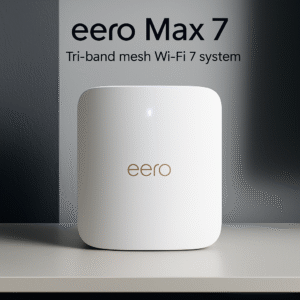
Experience the future of home networking with the Amazon eero Max 7, the brand’s most powerful mesh router yet. For those looking for a future-proof Wi-Fi 7 mesh router with multi-gig speeds, this device is built with the latest Wi-Fi 7 technology. It delivers up to 10 Gbps wireless and wired speeds, ensuring seamless connectivity for 4K/8K streaming, VR/AR gaming, video conferencing, and smart home automation.
As part of the eero TrueMesh system, the Max 7 reduces dead zones, minimizes interference, and keeps your devices connected to the fastest available band. Even as a single unit, it can cover up to 2,500 square feet. There is the option to expand coverage by adding additional eero Max 7 routers.
Equipped with four 10 Gigabit Ethernet ports, the Max 7 is built for both ultra-fast wired connections and robust wireless networking. It also integrates seamlessly with Amazon Alexa and all previous-generation eero routers. This makes it future-proof and backward-compatible.
Key Features – Future-Proof Wi-Fi 7 Mesh Router with Multi-Gig Speeds
-
To begin, Wi-Fi 7 support provides next-generation wireless performance with multi-gigabit capability.
-
Next, speeds of up to 10 Gbps deliver ultra-fast wired and wireless connectivity for demanding tasks.
-
Moreover, each unit covers up to 2,500 sq. ft., making it ideal for larger homes or apartments.
-
In addition, the expandable mesh system allows you to add more eero Max 7 units for seamless whole-home coverage.
-
For wired needs, 4 × 10 Gigabit Ethernet ports ensure blazing-fast connections for gaming, streaming, and workstations.
-
Furthermore, TrueMesh technology reduces dropouts and provides smooth roaming throughout the home.
-
Alongside this, backward compatibility means it works with all existing eero devices for flexible upgrades.
-
Finally, Alexa integration enables voice-controlled smart home management, making it the ultimate future-proof Wi-Fi 7 mesh router with multi-gig speeds.
Specifications
-
To start, the model is the Amazon eero Max 7 (Single).
-
In terms of Wi-Fi standard, it supports Wi-Fi 7 (802.11be) for cutting-edge connectivity.
-
Moreover, it delivers speeds up to 10 Gbps, combining both wired and wireless performance.
-
For coverage, each unit handles approximately 2,500 sq. ft., making it powerful for larger spaces.
-
Additionally, it includes 4 × 10 Gigabit Ethernet ports, offering unmatched wired connectivity.
-
The system runs on tri-band frequencies, including 2.4GHz, 5GHz, and 6GHz for maximum efficiency.
-
Furthermore, the quad-core processor is optimized for seamless mesh routing and high-performance tasks.
-
In addition, it is backward compatible with all eero models, ensuring easy expansion.
-
Finally, smart home integration includes Alexa and Matter readiness, solidifying its position as the future-proof Wi-Fi 7 mesh router with multi-gig speeds.
Compatibility & Use Cases
-
To begin, this router is best for high-demand households that rely on heavy streaming, online gaming, and robust smart home ecosystems.
-
Moreover, it works seamlessly with Amazon Alexa, allowing convenient voice-controlled network management.
-
In addition, it supports Matter devices, ensuring next-generation smart home compatibility.
-
Finally, it scales effortlessly—start with a single unit and expand later, making the future-proof Wi-Fi 7 mesh router with multi-gig speeds perfect for whole-home mesh coverage.
Setup & Maintenance Guide – Future-Proof Wi-Fi 7 Mesh Router with Multi-Gig Speeds
-
First, download the eero app on iOS or Android to begin setup.
-
Next, plug in the Max 7 and connect it directly to your modem.
-
Afterward, follow the guided steps in the app to configure your Wi-Fi network quickly.
-
In addition, add more eero devices if needed to expand your mesh coverage across larger spaces.
-
Finally, allow the system to update firmware automatically through the eero app for peak performance.
Maintenance: To ensure performance at its best, place it in a central location, reboot occasionally, and monitor network health regularly through the eero app.



&url=https://smarthomemaven.com/product/amazon-eero-max-7-future-proof-wi-fi-7-mesh-router-with-multi-gig-speeds-single-unit/&media=https://smarthomemaven.com/wp-content/uploads/2025/08/eero-Max-7-single-unit-placed-on-a-desk-glowing-LED-indicator-sleek-modern-background.png)
%20–%20Premium%204K%20Smart%20TV%20with%20Alexa%20&%20Dolby%20Vision%20IQ&url=https://smarthomemaven.com/product/amazon-fire-tv-omni-mini-led-55-2024-premium-4k-smart-tv-with-alexa-dolby-vision-iq/&media=https://smarthomemaven.com/wp-content/uploads/2025/08/Product-Only-Image-Square-White-Background-Slim-bezel-55-inch-Mini-LED-TV-front-view.png)
%20–%20Best%20Smart%20Displays%20for%20Video%20Calls%20and%20Alexa&url=https://smarthomemaven.com/product/amazon-echo-show-8-2nd-gen-best-smart-displays-for-video-calls-and-alexa/&media=https://smarthomemaven.com/wp-content/uploads/2025/05/Amazon-Echo-Show-8-2nd-Gen-2.png)

Reviews
There are no reviews yet.