

With smart TVs evolving rapidly, many 2025 models now feature Alexa voice control and built-in microphones, allowing users to interact with their entertainment systems hands-free. As a result, homeowners are beginning to ask a natural question—can Alexa TV voice control actually replace an Amazon Echo or Echo Dot speaker?
In this blog, we’ll examine the voice assistant functionality of leading models such as the Fire TV Omni, Samsung QN90C, and LG OLED C3, comparing them directly with Echo speakers. Moreover, we’ll explore smart home integration, audio performance, and feature limitations, while also identifying which devices are best suited for different use cases in a modern smart home setup.
How Alexa TV Voice Control Compares to Echo Speakers
Modern smart TVs equipped with Alexa TV voice control are more capable than ever, offering many of the same features traditionally found in Echo speakers. With built-in microphones and voice assistant integration, these TVs allow users to control their environment, access information, and interact hands-free—directly through the screen.
Alexa TV Features That Mirror Echo Devices
Voice commands for adjusting volume, switching inputs, or controlling smart home devices.
Timers, weather updates, reminders, and shopping lists for everyday convenience.
Two-way Alexa interaction with on-screen visuals, making commands more intuitive.
Microphones with wake-word recognition, allowing you to activate Alexa from across the room.
However, there are key distinctions between TVs with Alexa TV voice control and traditional Echo speakers:
| Feature | Echo Speaker | Alexa TV |
|---|---|---|
| Always-On Listening | ✅ Yes | ⚠️ Limited when TV is off |
| Multi-Room Audio Support | ✅ Yes | ⚠️ Only with additional equipment |
| Audio Quality | 🎵 Varies by model | 🎵 Dependent on TV speaker performance |
| Portability | ✅ Yes | ❌ No |
In short, Alexa TV voice control delivers impressive convenience for integrated home use, but Echo speakers still lead in consistent voice responsiveness, multi-room coverage, and flexibility.

Best TVs That Work Like an Echo in 2025
Different manufacturers approach Alexa TV voice control in unique ways, blending hands-free functionality with smart home automation. Here’s how three of the most popular 2025 TVs—Fire TV Omni QLED, Samsung QN90C Neo QLED, and LG OLED C3—compare in Alexa integration and usability.
Fire TV Omni QLED
Offers best-in-class Alexa integration with full voice command support.
Features hands-free wake word activation, even when the remote isn’t nearby.
Displays Alexa cards and visuals on-screen, similar to an Echo Show.
Functions as a smart home hub, allowing control of lights, thermostats, and other connected devices directly through the TV.
Samsung QN90C Neo QLED
Supports both Alexa and Samsung’s Bixby voice assistants for flexibility.
Requires the TV to be on or in ambient mode for Alexa commands to work.
Can trigger Alexa Routines with simple voice prompts, integrating well into a connected smart home.
LG OLED C3
Provides dual assistant support for Alexa and Google Assistant.
Requires the TV to be powered on to use Alexa voice features.
Supports LG ThinQ smart home commands through Alexa, bridging ecosystems for greater convenience.
Overall, the Fire TV Omni QLED offers the most seamless Alexa TV voice control, functioning like a true Echo device replacement. However, both Samsung and LG models provide strong integration options for users already invested in broader smart ecosystems.

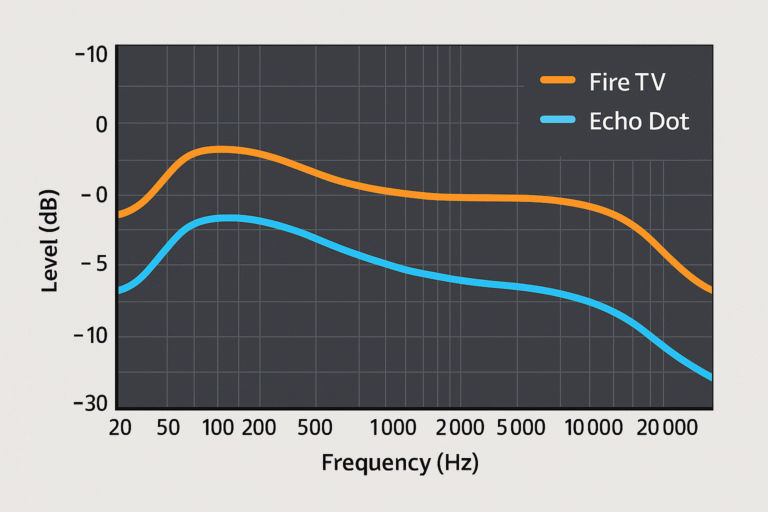
Audio Performance: Alexa TV Voice Control vs Echo Speakers
When comparing Alexa TV voice control to traditional Echo speakers, the biggest difference often lies in audio performance and design focus. Each device type is optimized for different listening experiences—TVs for clarity and integration, Echo speakers for depth and immersion.
Echo Speakers
Specifically engineered for 360° audio output, filling the room evenly.
Better suited for music streaming, podcasts, and ambient sound.
The Echo Studio in particular rivals many mid-range soundbars with its rich bass and spatial precision.
TV Speakers
Primarily designed for dialogue clarity and cinematic balance in movies or shows.
Offer limited bass response and surround depth, even on premium models.
Not ideal for standalone music playback, especially in larger rooms.
Verdict
For casual Alexa interaction—like asking questions, setting timers, or controlling smart home devices—TVs with Alexa voice control perform perfectly well. However, for music lovers or audio-first users, Echo speakers still deliver a superior acoustic experience, especially when paired with an existing entertainment setup.
Smart Home Commands: Do TVs Work Like an Echo?
Yes—but with limitations. TVs equipped with Alexa TV voice control can handle many of the same commands as an Echo device, making them surprisingly capable smart home hubs. However, there are still a few areas where Echo speakers maintain an advantage.
What You Can Do
Control smart devices: Ask Alexa to adjust lights, locks, and thermostats.
Trigger Alexa Routines: Launch automation scenes like “Movie Night” or “Good Morning.”
Request information: Get traffic updates, weather forecasts, or manage your calendar hands-free.
Limitations to Keep in Mind
Some TVs don’t respond to voice commands when powered off, depending on model and settings.
There’s no Drop-In or intercom support, meaning you can’t use the TV for room-to-room communication.
Multi-room Alexa audio control isn’t available natively and requires additional Echo devices or setup.
In short, Alexa TV voice control can manage most essential smart home tasks, but it doesn’t fully replace an Echo’s responsiveness, communication features, or whole-home audio capabilities.

How to Enable Alexa TV Voice Control on Popular 2025 Models
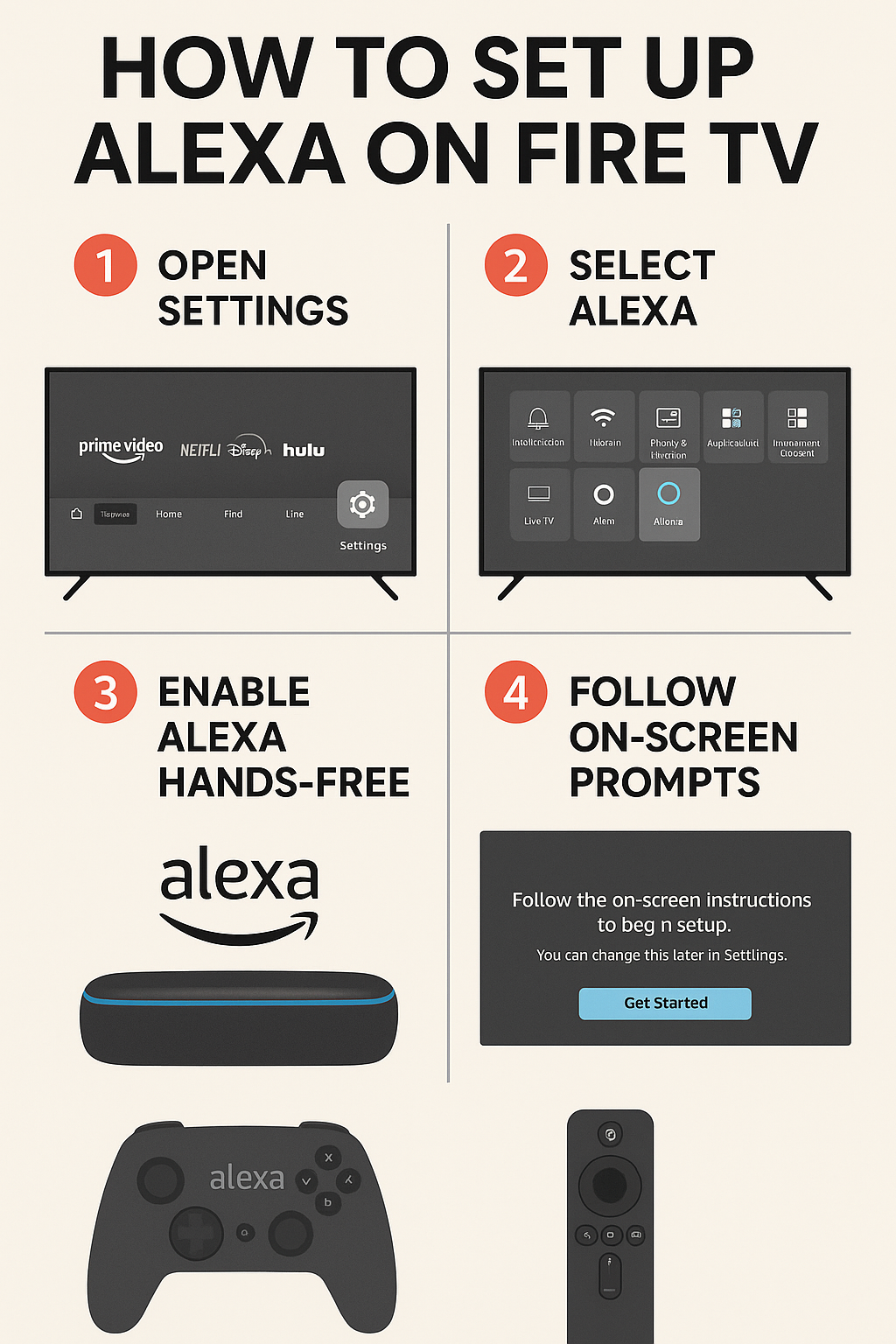
Setting up Alexa TV voice control is quick and straightforward, though the exact steps vary slightly by brand. Once connected, you’ll be able to manage smart devices, issue voice commands, and automate routines directly through your TV.
Fire TV Omni QLED
Go to Settings → Alexa.
Enable “Hands-free Alexa” to activate wake-word detection.
Link your Amazon account to sync devices, skills, and routines.
Samsung QN90C Neo QLED
Open the Smart Hub and select Voice Assistant Setup.
Choose Alexa as your preferred voice assistant.
Follow the prompts to sign in with your Amazon account for full functionality.
LG OLED C3
Open the ThinQ app on your smartphone.
Navigate to Assistant settings and enable Alexa.
Connect your Amazon account to integrate Alexa features and smart home control.
After setup, test your Alexa TV voice control by saying, “Alexa, turn on the lights” or “Alexa, open Netflix.” With these steps, your TV becomes more than a display—it becomes a hands-free smart home assistant.
When a TV Can Replace Your Echo
While Alexa TV voice control brings impressive smart features to modern TVs, it’s not a perfect replacement for every use case. Depending on your living space and priorities, it may serve as a convenient upgrade or a limited substitute for a full Echo setup.
Ideal Scenarios
Small apartments or condos where space-saving smart tech is essential.
Secondary rooms like kitchens or bedrooms, where having Alexa built into the TV reduces clutter.
Visual-first users who enjoy seeing weather, shopping lists, or video responses on-screen.
New smart home setups that rely on Alexa routines for automation and convenience.
Not Ideal If
You prioritize superior audio quality for music streaming or immersive sound.
You need always-on hands-free access, as most TVs disable Alexa when powered off.
You depend on Drop-In or intercom features, which are unavailable on TV-based Alexa systems.
In summary, Alexa TV voice control works best as a secondary or hybrid smart assistant, bridging entertainment and automation. However, for consistent, high-quality voice interaction, a dedicated Echo device remains the better option.

Expanding Alexa TV Voice Control for Larger Homes
For those with larger homes or more advanced entertainment systems, combining Alexa TV voice control with dedicated Echo devices can dramatically enhance both coverage and performance. This hybrid approach ensures consistent voice access, deeper sound, and better multi-room integration.
Recommended Combinations
Echo Studio + Fire TV: Delivers spatial audio and powerful bass, transforming your viewing experience into a theater-like setup.
Echo Dot in another room: Provides always-on Alexa access, even when the TV is off, ensuring seamless voice control throughout the home.
Echo Show: Offers visual feedback separate from your TV—perfect for checking cameras, recipes, or video calls without interrupting your entertainment.
Tip: Use Alexa’s multi-room groups to keep music, announcements, or routines perfectly synchronized across all your devices.
By combining these elements, you can extend the reach of Alexa TV voice control, turning your entertainment system into a whole-home smart assistant network that responds wherever you are.

Conclusion: The Real Role of Alexa TV Voice Control
While Alexa-enabled TVs deliver impressive convenience and hands-free functionality, they still don’t fully replace the capabilities of dedicated Echo devices—particularly when it comes to audio fidelity, always-on responsiveness, and advanced smart home hub performance.
However, for casual users, small homes, or those who value display-based integration, smart TVs like the Fire TV Omni QLED offer an excellent balance of voice control, entertainment, and automation. They bring the core Alexa experience directly to your screen, eliminating extra devices while keeping your setup streamlined.
Ultimately, the decision comes down to matching your lifestyle with your priorities. If you want consistent whole-home voice coverage, an Echo remains essential. But if your goal is a simplified, display-driven smart home experience, Alexa TV voice control is a capable and modern alternative that delivers impressive results for everyday living.
🔗 Want to explore more smart TV integrations? Next up: Top Alexa TV Routines for Smart Homes in 2025