


Description
ULTRALOQ U-Bolt Pro Wi-Fi Smart Lock – Best WiFi-Enabled Biometric Smart Lock with 6-in-1 Keyless Entry & App Control – Smart Home Maven
Description:
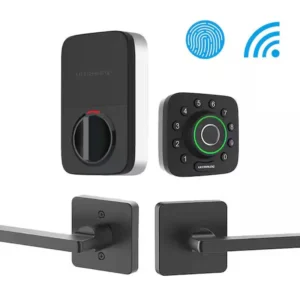
The ULTRALOQ U-Bolt Pro Wi-Fi Smart Lock redefines home access with an all-in-one, ultra-secure smart deadbolt solution. It’s among the best WiFi-enabled biometric smart locks available today. Designed for flexibility and top-tier protection, it offers 6 convenient unlocking methods, including biometric fingerprint recognition, a numeric anti-peep keypad, smartphone app control, auto-unlock via proximity, voice control, and a physical key backup.
With built-in Wi-Fi, you can manage your lock remotely using the ULTRALOQ app, granting or revoking access in real time and receiving instant notifications of every entry. Its DIY-friendly installation and ANSI Grade 1 certification make it a top choice for homeowners and rental property managers alike.
Durably built with an IP65 weatherproof rating, this lock stands up to the elements while integrating seamlessly with your smart home ecosystem.
Key Features – Best WiFi-Enabled Biometric Smart Locks
The ULTRALOQ U-Bolt Pro Wi-Fi ranks among the best WiFi-enabled biometric smart locks because it blends speed, convenience, and top-tier security. As a result, homeowners and rental property managers gain peace of mind with every use.
-
6-in-1 Unlocking – Choose from fingerprint, keypad, smartphone app, auto-unlock, voice control, or a mechanical key.
-
Fingerprint ID – Stores up to 120 fingerprints and recognizes users in less than 0.4 seconds.
-
Built-In Wi-Fi – Manage and monitor remotely via the ULTRALOQ app, with no hub required.
-
Voice Assistant Integration – Works seamlessly with Amazon Alexa and Google Assistant.
-
Access Logs & Alerts – Track entries in real time with notifications sent directly to your phone.
-
Anti-Peep Keypad – Enter codes safely, even if someone is watching nearby.
-
Weatherproof Design – With an IP65 rating, it performs reliably indoors or outdoors.
Specifications
When reviewing the best WiFi-enabled biometric smart locks, the ULTRALOQ U-Bolt Pro Wi-Fi stands out with advanced specs designed for durability, security, and convenience. For this reason, here are the key details:
-
Model – ULTRALOQ U-Bolt Pro Wi-Fi, engineered for modern entryway security.
-
Connectivity – Built-in 2.4GHz Wi-Fi allows direct access without an additional hub.
-
Power – Operates on 4 × AA batteries (included for quick setup).
-
Battery Life – Runs for up to 1 year or approximately 10,000 uses before replacement.
-
Fingerprint Capacity – Stores up to 120 unique fingerprints for biometric access.
-
User Codes – Supports up to 60 customizable codes, ideal for family members, guests, or tenants.
-
Door Thickness Support – Fits doors ranging from 1.38″ to 2″, ensuring wide compatibility.
-
Security Grade – Certified ANSI Grade 1, the highest rating for residential locks.
-
Weather Resistance – Rated IP65, making it resistant to dust and water.
-
Material – Built with a durable zinc alloy housing for long-term reliability.
Works With
The best WiFi-enabled biometric smart locks are designed to integrate effortlessly with your smart home ecosystem. As a result, you can enjoy convenient control and automation without extra hardware:
-
Amazon Alexa – Manage access using hands-free voice commands.
-
Google Assistant – Check lock status or control your door with simple prompts.
-
IFTTT – Create custom automations to fit your lifestyle.
-
ULTRALOQ App (iOS & Android) – Unlock, monitor, and manage directly from your phone.
-
No Hub or Subscription Needed – Everything works right out of the box.
Installation
Setting up one of the best WiFi-enabled biometric smart locks is quick and hassle-free. In fact, most users can complete installation in under 15 minutes:
-
Easy DIY Install – All you need is a standard screwdriver.
-
Universal Fit – Compatible with most standard US deadbolt doors.
-
Guided Setup – The in-app wizard walks you through pairing step by step.
Setup Steps – Best WiFi-Enabled Biometric Smart Locks
To get started with one of the best WiFi-enabled biometric smart locks, follow these simple steps for quick installation and setup:
-
First, download and install the ULTRALOQ App on your smartphone.
-
Next, connect the lock directly to your Wi-Fi network for seamless access.
-
Then, register fingerprints, create user codes, and set up mobile app access.
-
Finally, enable notifications, auto-lock settings, and voice assistant features for added convenience.
Maintenance Tips
To keep the best WiFi-enabled biometric smart locks running smoothly, follow these maintenance guidelines:
-
First, replace the batteries yearly or as indicated by low-power alerts.
-
Next, clean the fingerprint sensor with a microfiber cloth to maintain accuracy.
-
Finally, update the firmware regularly through the app to access the latest features and security improvements.






Reviews
There are no reviews yet.